About this website
Tips for using this site and seeing it at its best.
Accessibility
I try to make this site as accessible as I can, by following most of the web content accessibility guidelines.
These access keys work on all pages ( use Alt + Shift + access key on Windows; Control + access key on a Mac):
- Access key 1 — Home
- Access key 3 — Site map
- Access key 4 — Search
- Access key 9 — Contact details
These access keys work on some pages:
- Access key n — Next page
- Access key p — Previous page
Why
These are some of the reasons why I spend time building and maintaining this website:
- To explain the things I do (and don't do) in my business
- To introduce myself
- To talk about my projects
- To exchange files with my clients and colleagues
- To gather and curate information that is useful or interesting
- To experiment with web technology and ideas
- To have a place where I can express and refine my thoughts, through writing and photography
How
This is a do-it-myself website. I design the pages, create the templates, write the text, do the HTML markup and some basic PHP code and javascript.
I started in 1998, using Microsoft FrontPage and a dial up connection to make a primitive site at an ISP address (www.powerup.com.au/~petermk). In early 2002 I registered the domain marquis-kyle.com.au and moved the site to a better server where I could run Movable Type. I had trouble getting FrontPage to produce valid markup, so I shifted to Dreamweaver. I have continued to improve the site’s quality and ease of use.
I still use Dreamweaver (in Code mode) along with Notepad++ for writing the content. I use Movable Type to manage the parts that are frequently updated—Marking time, Projects, Special places, and Cartes-de-visite.
Privacy
My clients disclose private and sensitive information to me in the course of my work. I keep this information private, and don't pass it on to other people without the consent of my clients.
Through my community work on advisory committees and community organisations I am sometimes privy to sensitive information. I protect the privacy of this information in accordance with the protocols of the committee or organisation.
If you send me an email message about anything on this site (as I hope you will), I am quite likely to answer and continue the dialog. I may modify the site as a result of your comment—and I might acknowledge your contribution (but I will ask before I use your name). I won’t disclose your email address to anyone without your consent.
Disclaimer
I have written and published this web site to impart information of general interest. I disclaim any responsibility for its applicability to particular cases. If you want specific advice about conserving a significant place, perhaps you need my professional services.
Copyright
Unless credited to someone else, copyright in all the text, images and designs on this site belongs to me, Peter Marquis-Kyle.
- You may freely
- view everything you can find on this site
- print copies for your personal use
- link to any page on this site from other websites (please let me know if you do, just for my own interest)
- But you may not without my permission
- store any of this content on a disk or file server (except for files cached by your browser)
- publish or reproduce anything here, electronically or on paper (except for fair dealing in accordance with Australian copyright law)
Monitor adjustment
If your monitor is out of adjustment, it won't display subtle tone differences in photo images, and you will miss out. I have made a test image (below) so you can check your monitor settings.
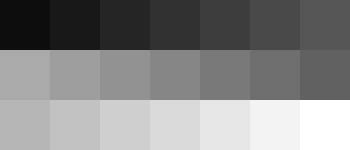
This grid of grey tones goes from 0% white to 100% white in 5% steps. In a well adjusted monitor you should be able to see clear steps between all 21 tones. Pay attention to the light and dark ends of the range, and adjust brightness and contrast for the best result. It’s hard to get this right (and hard to see screen images at their best) in a brightly lit room.
Link colours
Most link text should show these colours:
 Fresh (unvisited) links are Blue.
 Recently visited links are Dark blue.
 Links within this site turn Red when the mouse pointer hovers over them.
 Links to other sites display a Green background when the mouse pointer hovers over them.
Are you red/green colour-blind? If you are, even with the right browser, the red and green will look the same to you. That’s why I made the outbound links show the coloured background when the mouse pointer hovers over them.
Hosting
Since February 2011 this website has been hosted by digitalpacific.com.au on a shared server. I’ve been happy with the service.
Acknowledgments
I am grateful to the providers and supporters of the following free software and services: